BindCraft Workflow
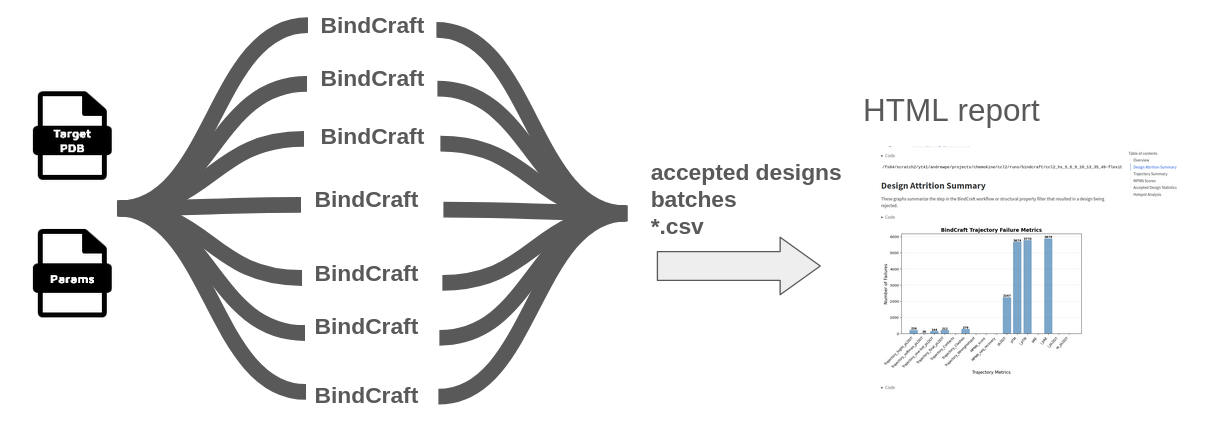
Parallel BindCraft execution for protein binder design across multiple GPUs.
Overview
The --method bindcraft workflow runs BindCraft trajectories in parallel across multiple GPUs - ideal for HPC clusters or multi-GPU workstations.
Key Differences
Unlike a 'vanilla' BindCraft run which runs on a single GPU indefinitely until finding N accepted designs, this pipeline:
- Runs a fixed number of relaxed trajectories (
--bindcraft_n_trajper input PDB) - Stops when complete (predictable runtime)
- Parallelizes across available GPUs
- Outputs an HTML summary report
--input_pdb accepts a single file, a directory of PDB files, or a quoted glob (e.g. 'input/*.pdb'). Shared settings (--target_chains, --hotspot_res, --contigs) apply to every input PDB. Batch directories and design names use <pdbName>_<batchIndex> (e.g. batches/PDL1_0/). Merged stats CSVs (final_design_stats.csv, trajectory_stats.csv, mpnn_design_stats.csv) include a Target column with the input structure filename including extension (e.g. PDL1.pdb) so multi-PDB runs can be compared; the HTML report displays Target without the extension.
If you want to generate a specific number of accepted designs, we suggest running a small number of trajectories (--bindcraft_n_traj 100 or --bindcraft_n_traj 300) to assess the acceptance rate, then knowing the ratio of accepted designs to total trajectories, do a larger run to generate (approximately) the desired number of accepted designs. The HTML report headline accept rate collapses MPNN duplicates (multiple accepted sequences from the same trajectory count once); the rate including all accepted MPNN sequences is shown as well. Multi-PDB runs also get per-target accept rates and metric comparisons.
Command-line Options
See available options with --method bindcraft --help:
nextflow run Australian-Protein-Design-Initiative/nf-binder-design \
  --method bindcraft --help
Example Usage
#!/bin/bash

nextflow run Australian-Protein-Design-Initiative/nf-binder-design \
  --method bindcraft \
  --input_pdb 'input/PDL1.pdb' \
  --outdir results \
  --target_chains "A" \
  --hotspot_res "A56,A125" \
  --hotspot_subsample 0.5 \
  --binder_length_range "55-120" \
  --bindcraft_n_traj 2 \
  --bindcraft_batch_size 1 \
  --bindcraft_advanced_settings_preset "default_4stage_multimer" \
  --bindcraft_filters_preset "default_filters" \
  -profile local \
  -resume
For running on SLURM, you can use the -profile slurm flag instead of -profile local, with --slurm_account=xxYY and the appropriate -c site-specific configuration file (refer to and adapt from the rfdiffusion example).
Key Parameters
| Flag | Description |
|---|---|
--input_pdb |
Target PDB file, directory of PDBs, or quoted glob (e.g. 'input/*.pdb'). --bindcraft_n_traj is run per input PDB |
--target_chains |
Target chain IDs (comma-separated) |
--hotspot_res |
Hotspot residues (comma-separated) |
--hotspot_subsample |
Random proportion of hotspot residues per design (explores hotspot selection) |
--binder_length_range |
Range of binder lengths to design |
--bindcraft_n_traj |
Number of trajectories to run per input PDB |
--bindcraft_batch_size |
Number of trajectories per batch |
--gpu_devices |
Specify multiple GPUs, e.g., --gpu_devices=0,1 — use only for -profile local |
BindCraft Presets
Advanced Settings Presets
| Flag | Description |
|---|---|
--bindcraft_advanced_settings_preset |
Use a preset from settings_advanced (without .json extension) |
Keep in mind, the experimental success rate of the advanced presets may not have been as rigorously validated as the
default4stage_multimerpreset. Caveat emptor.
Filter Presets
| Flag | Description |
|---|---|
--bindcraft_filters_preset |
Use filter settings presets from settings_filters (without .json extension). In most cases, it's probably best to stick with the default. |
Output Structure
Results are saved to --outdir in the bindcraft/ subdirectory:
── bindcraft
│   ├── accepted
│   │   └── results
│   │       └── Accepted
│   │           ├── bindcraft_design_1_l57_s942028_mpnn6_model1.pdb
│   │           └── bindcraft_design_1_l57_s942028_mpnn8_model2.pdb
│   ├── batches
│   │   ├── PDL1_0
│   │   │   └── results
│   │   │       ├── failure_csv.csv
│   │   │       ├── final_design_stats.csv
│   │   │       ├── mpnn_design_stats.csv
│   │   │       ├── Trajectory
│   │   │       └── trajectory_stats.csv
│   │   └── PDL1_1
│   │       └── results
│   │           ├── Accepted
│   │           ├── failure_csv.csv
│   │           ├── final_design_stats.csv
│   │           ├── MPNN
│   │           ├── mpnn_design_stats.csv
│   │           ├── Rejected
│   │           ├── Trajectory
│   │           └── trajectory_stats.csv
│   ├── bindcraft_report.html
│   ├── failure_csv.csv
│   ├── final_design_stats.csv
│   ├── mpnn_design_stats.csv
│   └── trajectory_stats.csv
└── logs
    ├── dag_20250725_084959.html
    ├── report_20250725_084959.html
    ├── timeline_20250725_084959.html
    ├── trace_20250725_084959.txt
A summary report is generated as bindcraft_report.html.
FoldSeek Structural Search (Optional)
After BindCraft completes, you can optionally run FoldSeek structural similarity search on accepted designs. The binder chain is automatically extracted from each accepted complex — only the binder is searched, not the full target–binder complex.
FoldSeek summary results are output to {outdir}/foldseek/{database_name}/. See FoldSeek output format for details.
Enabling FoldSeek
Add --do_foldseek to your bindcraft command:
nextflow run main.nf --method bindcraft \
  --input_pdb target.pdb --target_chains A \
  --do_foldseek
FoldSeek Flags
| Flag | Default | Description |
|---|---|---|
--do_foldseek |
false |
Enable FoldSeek search on accepted designs |
All common --foldseek_* flags (database, search mode, output options, CATH annotation) are documented in the FoldSeek subworkflow docs.
Examples
The examples/ directory contains complete working examples for BindCraft workflows:
examples/pdl1-bindcraft: PDL1 binder example from the BindCraft repositoryexamples/egfr-bindcraft: an EGFR binder design exampleexamples/mdm2-bindcraft-peptide- peptide binder design for MDM2, based on Filus et al, 2025
See the examples/README.md for details.