RFDiffusion3 Workflow (--method rfd3)
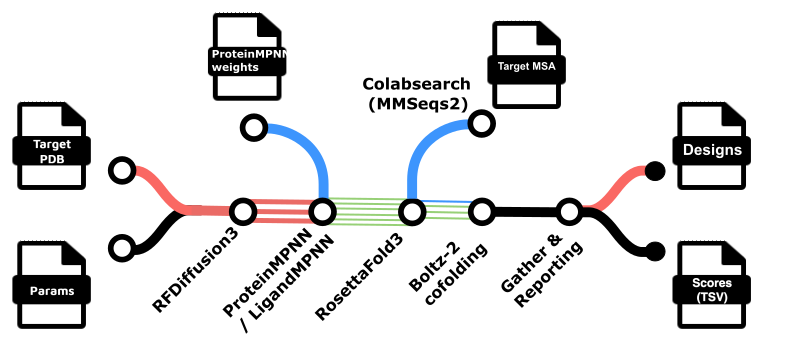
RFdiffusion3-based workflow for de novo protein binder design using the RostettaCommons/foundry RFDiffusion3 (rfd3), MPNN (mpnn for ProteinMPNN, SolubleMPNN or LigandMPNN), and RosettaFold3 (rf3).
See also: Official RFDiffusion3 documentation.
Overview
The RFdiffusion3 workflow is activated by using: --method rfd3
Partial diffusion refinement (as in
--method rfd_partial) is not yet implemented for RFDiffusion3. This may be added in a future version.
General Information
Command-line Options
You can see the available options for the workflow with:
nextflow run Australian-Protein-Design-Initiative/nf-binder-design \
  --method rfd3 --help
Parameters File
As with other workflows, parameter command-line options (those prefixed with --) can also be defined in a params.json file:
nextflow run Australian-Protein-Design-Initiative/nf-binder-design \
  --method rfd3 \
  -params-file params.json
Example params.json:
{
  "contigs": "A17-131,/0,50-120",
  "hotspot_res": "A56,A115,A123",
  "rfd3_hotspot_subsample": 0.66,
  "rfd3_n_designs": 10
}
You can use "hotspot_subsample": 0.66 instead of rfd3_hotspot_subsample (for commandline compatibility with the BindCraft workflow). Omit both or set rfd3_hotspot_subsample to 1.0 to use every listed hotspot in each batch.
Config Mode (--rfd3_config)
In this mode you provide a full RFDiffusion3 input file (JSON or YAML) that follows the Foundry documentation
RFdiffusion3 — Protein binder design examples.
Example (single-target JSON, adapted from the Foundry docs):
{
  "pdl1": {
      "dialect": 2,
      "infer_ori_strategy": "hotspots",
      "input": "input/PDL1.pdb",
      "contig": "50-120,/0,A18-132",
      "select_hotspots": {
          "A56": "CG,OH"
      },
      "is_non_loopy": true
  }
}
You can then run:
nextflow run Australian-Protein-Design-Initiative/nf-binder-design \
  --method rfd3 \
  --rfd3_config pdl1_rfd3.json \
  --rfd3_n_designs 10 \
  --rfd3_batch_size 1 \
  -profile local
In this mode, the workflow passes your config directly to RFDiffusion3; some sampler options defined outside the config file (e.g. inference_sampler.step_scale, inference_sampler.gamma_0) are provided as commandline options (eg --rfd3_step_scale, --rfd3_gamma_0), the rest can be passed directly via --rfd3_extra_args.
Params Mode (--contigs, --hotspot_res, etc.)
In params mode, the workflow builds a minimal RFDiffusion3 JSON config for you internally. This is convenient for quick runs and for users familiar with the RFdiffusion v1 (rfd) workflow.
Minimal example:
OUTDIR=results
mkdir -p "$OUTDIR/logs"

nextflow run Australian-Protein-Design-Initiative/nf-binder-design \
  --method rfd3 \
  --input_pdb input/pdl1.pdb \
  --outdir "$OUTDIR" \
  --design_name pdl1_rfd3 \
  --contigs "A17-131,/0,50-120" \
  --hotspot_res "A56,A115,A123" \
  --rfd3_n_designs 10 \
  --rfd3_batch_size 1 \
  -profile local
Key behaviour in params mode:
- Contigs (
--contigs) - Accepts both RFdiffusion v1-style contigs (e.g.
[A18-132/0 65-120]) and RFDiffusion3 v3-style contigs (e.g.A18-132,/0,65-120). - The workflow automatically normalises v1-style strings to v3 format before building the config.
- RFDiffusion3 v3-style contigs are recommended for new projects.
Chain IDs in RFD3 output vs input PDB
RFD3 assigns chain letters A, B, … in contig polymer order (polymers separated by /0 in v3), not by copying chain IDs from your input PDB/CIF.
- Contig
C18-132,/0,50-120: the first chain (chain C in the input PDB) is the target (template) and the second is the de novo binder length range to generate. In this case, the RFD3 output will have A = target, B = binder. - Contig
50-120,/0,C18-132: the first chain is the binder and the second is the target - in this case, the RFD3 output will have A = binder, B = target.
The workflow default --mpnn_designed_chains='auto' infers which output chain is the binder (only the case where you are generating a single binder chain is supported). If you set --mpnn_designed_chains explicitly (e.g. A or B, or A,B) be sure you are choosing chain IDs that match the expected RFD3 output chain IDs. Use task.ext.args to pass any additional arguments to MPNN.
After MPNN, RosettaFold3 input JSON uses the same target and binder chain IDs as RFDiffusion3 (first polymer A, second B, etc.): the trimmed template is renamed to the target letter, and the binder component uses the binder letter. Optional Boltz full refold, design-vs-refold RMSD, IPSAE, and combined_scores.tsv sequence extraction all use that same pair so chain IDs stay consistent end to end. Two polymers in the contig are required for this automatic pairing (see bin/rfd3/stage_rfd3_config.py infer-rfd3-chain-pair).
- Hotspots (
--hotspot_res) - Accepts a comma-separated list of residue IDs, e.g.
--hotspot_res "A56,A115,A123". - The internal config generator converts these to
select_hotspotsentries with"ALL"atoms for each residue (all atoms of each residue are targeted). -
In many cases it is preferable to target specific atoms (e.g.
CG,OHfor a tyrosine). To do this with RFD3, you should instead use a full JSON/YAML config with an explicitselect_hotspotsdictionary, as described in the official RFD3 documentation:
RFdiffusion3 — Protein binder design examples. -
Hotspot subsampling (
--rfd3_hotspot_subsample, alias--hotspot_subsample) - Optional fraction in
[0.0, 1.0](default1.0: use all hotspots).--rfd3_hotspot_subsample. the number of hotspots kept ismax(1, ceil(N × fraction)), chosen withrandom.sampleonce per RFDiffusion3 batch (each parallel Nextflow task gets a different subset). - Params mode: subsamples the residues from
--hotspot_resafter the full list is written toselect_hotspotsin the generated config. - Config mode: subsamples keys of each spec’s
select_hotspotsobject (entries withoutselect_hotspotsare unchanged).
Key Parameters
Below is a summary of the most important parameters for --method rfd3.
Core RFdiffusion3 Parameters
-
--input_pdb
Target PDB/CIF file for binder design (cropped to the chains and residues of interest). -
--rfd3_config
Path to a RFDiffusion3 JSON/YAML config file (config mode).
When set, this overrides params-mode config generation. -
--contigs(params mode)
Contig definition for RFDiffusion3, specifying the binder length range and target residues. - Example (v3 style):
--contigs "A17-131,/0,50-120". -
Example (v1 style):
--contigs "[A18-132/0 65-120]"(auto-translated to v3). -
--hotspot_res(params mode)
Hotspot residues as a comma-separated list, e.g.--hotspot_res "A56,A115,A123".
This is converted to residue-levelselect_hotspotswith"ALL"atoms per residue. For atom-level hotspot control, use a JSON/YAML config withselect_hotspots. -
--rfd3_hotspot_subsample
Fraction of hotspot residues (orselect_hotspotskeys) to keep per RFDiffusion3 batch; default1.0(no subsampling). Matches BindCraft behaviour (ceil(N × fraction), at least one hotspot). Ignored when there are no hotspots in that batch’s config. Aliased to--hotspot_subsample -
--rfd3_n_designs
Total number of RFDiffusion3 backbones to generate. -
--rfd3_batch_size
Number of designs per RFDiffusion3 batch (diffusion_batch_size). Default is1. Larger batches make each diffusion task longer but amortise model setup, which can speed up the overall run. -
--rfd3_step_scale
Setsinference_sampler.step_scale. Default is3, following the Foundry recommendation for improved PPI designability (rather than rfd3 default of 1.5). -
--rfd3_gamma_0
Setsinference_sampler.gamma_0. Default is0.2, matching the Foundry recommendation for improved PPI designability (rather than rfd3 default of 0.6). -
--rfd3_is_non_loopy
Passed through to the generated config asis_non_loopy. When unset (default), the key is omitted from the config. Whentrue, addsis_non_loopy: true(more all-helical binders, less loops); whenfalse, addsis_non_loopy: false(more loops, more beta-sheet and mixed-alpha/beta designs). -
--rfd3_extra_args
Additional CLI arguments passed through to the RFDiffusion3 CLI (e.g. extra sampler overrides). eg,--rfd3_extra_args "low_memory_mode=True". -
--rfd3_filters
Semicolon-separated list of filters applied to RFD3 backbone structures immediately after RFDiffusion3, before MPNN. Uses the same filter system as the RFdiffusion v1 workflow (e.g.bin/filter_designs.pyandbin/filters.d/). The binder chain for filtering is the same chain MPNN redesigns (see--mpnn_designed_chains/ contig order above). Example:--rfd3_filters "rg<25"to keep only binders with a radius of gyration (Rg) below 25 Å.
ProteinMPNN Parameters
ProteinMPNN is run on each backbone produced by RFD3. The workflow supports both modern mpnn_ options and a set of backwards-compatible pmpnn_ options:
For consistency with the previous RFdiffusion v1 (
rfd) workflow, some legacypmpnn_options are supported and applied as the equivalentmpnn_option. We encourage you to use only the--mpnn_options, since the backward compatible--pmpnn_options in RFD3 may be removed in a later version.
Common options:
-
--mpnn_model_type
Model type for ProteinMPNN (e.g.protein_mpnn). Default:protein_mpnn. -
--mpnn_legacy_weights
Whether to use the legacy ProteinMPNN weights format. Default:true. -
--mpnn_designed_chains
Chain IDs passed to ProteinMPNN as--designed_chains.auto(default): infer the binder chain from the contig (exactly one polymer of length-only segments, e.g.50-120). Otherwise use explicit chain ID(s), e.g.BorA,B. See Chain IDs in RFD3 output vs input PDB. -
--mpnn_batch_size(or the legacy--pmpnn_seqs_per_struct)
Number of sequences to sample per backbone. Default: 1 sequence per backbone (via--pmpnn_seqs_per_struct=1when--mpnn_batch_sizeis not set). -
--mpnn_temperature(or the legacy--pmpnn_temperature)
Sampling temperature for ProteinMPNN. Default:0.1. -
--mpnn_structure_noise(or the legacy--pmpnn_augment_eps)
Passed to Foundry MPNN as--structure_noise: Gaussian noise (standard deviation in Å) added to input coordinates at inference. This is independent of which checkpoint you load. Default:0(no coordinate noise). -
--mpnn_omit(or the legacy--pmpnn_omit_aas)
Residues to omit from the sequence design; 1-letter codes (e.g.CX) are automatically mapped to appropriate 3-letter lists for MPNN. Default:CX(omit cysteine and unknown). -
--mpnn_checkpoint_path(or the legacy--pmpnn_weights)
Path to a custom checkpoint. When set,--mpnn_presetand--mpnn_weights_noiseare ignored, and--mpnn_model_type/--mpnn_legacy_weightsare used as you specify. Default:false(see preset/noise below). -
--mpnn_preset
Selects the weight family when--mpnn_checkpoint_pathis not set:vanilla(ProteinMPNN),soluble(SolubleMPNN), orhyper(HyperMPNN). All use Foundry’sprotein_mpnnarchitecture with legacy weights.false(default): same default checkpoint as before (proteinmpnn_v_48_020.ptunder/models/foundry/in therc-foundryweights container). -
--mpnn_weights_noise
Selects the training-time coordinate noise tier used to train that checkpoint (filename suffix in the bundled weights). Allowed values:005,010,020,030, corresponding to 0.05 Å, 0.1 Å, 0.2 Å, and 0.3 Å.false(default) means020.
Quoting: use a string—JSON in -params-file ("mpnn_weights_noise": "005") or a quoted CLI value (--mpnn_weights_noise '005'). Bare 005 on the CLI may become integer 5; the workflow normalises valid tiers to 005/010/… anyway. Vanilla/soluble 005 loads *_002.pt; hyper has no 005 tier (table below).
--mpnn_weights_noise |
Training noise (Å) | Vanilla / soluble filename suffix | Hyper filename (epoch 300) |
|---|---|---|---|
005 |
0.05 | _002.pt |
(invalid; use custom path or other tiers) |
010 |
0.1 | _010.pt |
v48_010_epoch300_hyper.pt |
020 |
0.2 | _020.pt |
v48_020_epoch300_hyper.pt |
030 |
0.3 | _030.pt |
v48_030_epoch300_hyper.pt |
RosettaFold3 Parameters
-
--rf3_ckpt_path
Path to the RF3 checkpoint used for structure prediction of designed binders (and complexes). A sensible default path inside the container is set in the workflow, but it can be overridden if needed. -
--rf3_early_stopping_plddt_threshold
Exit early if mean pLDDT is below this value after the first recycle. Default:0.5. This helps speed up the workflow by stopping early if the structure is not likely to be a high-quality selected binder. -
--rf3_num_steps
Number of diffusion steps for RF3. Default:50(different to the therf3CLI default, which is 200; 50 is faster with no observed difference in quality). -
--rf3_n_recycles
Number of recycles in the RF3 structure module. Default:10(matchesrf3CLI default). -
--rf3_diffusion_batch_size
Batch size for the diffusion step inside each RF3 prediction. Default:5(matchesrf3CLI default). -
--rf3_batch_size
Number of structures folded together in onerf3 foldinvocation (multiple inputs in a single JSON config). Default is1(one design per GPU task). Values greater than1are generally more efficient since they reduce how often the RF3 model is loaded - individual tasks/jobs will take longer but the overall walltime will be shorter with larger batches. Site configs may scaleROSETTAFOLD3time limits with--rf3_batch_size.
RF3 MSA and template options
RosettaFold3 structure prediction can use a target-chain MSA and/or structural templates to improve prediction quality (see RF3 inference documentation).
-
--rf3_create_target_msa
Whentrue, create a target-chain MSA for RF3 via local ColabFold/MMseqs2 or an external MSA server. Default:false. -
--rf3_alignment
Path to an external A3M-format MSA file for the target chain. When set, this file is used as the RF3 target MSA and no MMseqs2/ColabFold search is run for RF3.--rf3_create_target_msaand--rf3_alignmentare mutually exclusive. -
--rf3_use_msa_server
Whentrueand--rf3_create_target_msais set (and--rf3_alignmentis not), the workflow queries the ColabFold MMseqs2 API (https://api.colabfold.com) viabin/colabfold_remote_msa.pyto obtain target MSAs instead of running local ColabFold/MMseqs2. No local--colabfold_envdbor--uniref30are required in this case. Default:false. -
--rf3_target_fasta
Optional path to a target FASTA file used when building the RF3 target MSA (only when--rf3_create_target_msais set and--rf3_alignmentis not). If unset, the query sequence is taken from--input_pdb/ configinput(chain A), or from the prepared--rf3_target_templatestructure (same as the RF3 template step) with the inferred target chain when that option is set. Mutually exclusive with--rf3_target_template(you cannot pass both flags). -
--rf3_target_template
Path to an alternative PDB or CIF to use as the RosettaFold3 template instead of the default structure from--input_pdb/ the--rfd3_configinputpath. This file is not trimmed to contigs. Chains are aligned to the target chain from your contigs / RFD3 output): single-chain files are renamed if needed; multi-chain files require--rf3_template_selectionnaming the target chain as it appears in this file (only one chain may be referenced). If the contig target letter already exists on the template and you omit--rf3_template_selection, that chain is kept (same behaviour as before). The target sequence RF3 uses is taken from this template (RF3 does not allow a separate targetseqcomponent alongside the same chain in the template). Mutually exclusive with--rf3_target_fasta. When--rf3_create_target_msais set (and--rf3_alignmentis not), the target MSA query sequence is taken from the prepared template withrfd3TargetChain. -
--rf3_template_selection
Comma-separated RF3template_selectionAtomSelection tokens (see RF3 templating). With--rf3_target_template: use chain IDs from that template file (e.g.CorC/*/1-50); (the workflow rewrites them internally to match the RFDiffusion3 target chain). Omit for “whole target chain”. Without--rf3_target_template: selections refer to the prepared template. Default all residues inrf3_target_templatewill be used as a template.
By default, the target structure from --input_pdb (or the config input path) is used as the single RF3 template (one template per chain; RF3 does not accept multiple templates per chain). Override with --rf3_target_template when you want a different structure. In the default case, the workflow prepares that template so it matches what RFDiffusion3 sees: if the input is mmCIF it is converted to PDB (gemmi); the structure is trimmed to the same contig ranges as RFD3 (see --contigs or the config’s contig field) via bin/trim_to_contigs.py (supports both v1 and v3 contig syntax); then all chain IDs in the trimmed structure are renamed to the target chain letter inferred from contig polymer order (e.g. A when the target is the first polymer, B when the target is the second), matching the chain ID of the target in RFD3/MPNN design CIFs.
When --rf3_create_target_msa is true, --rf3_alignment is not set, and --rf3_use_msa_server is false, you must provide --colabfold_envdb and --uniref30 (same as for the optional Boltz full refold step).
Full refolding parameters (Boltz-2)
The workflow supports an optional full refolding step (e.g. using Boltz-2) to validate the ROSETTAFOLD3 predicted structures, optionally using a non-truncated target sequence, with an optional target MSA and/or target template structure.
-
--full_refold_with
Tool to use for full refolding (e.g.boltz). Default: disabled. -
--full_refold_max
Maximum number of top scoring ROSETTAFOLD3 designs to pass to the full refolding step. -
--full_refold_filter_sort
The metric used to sort the ROSETTAFOLD3 outputs before prioritizing them for full refolding via--full_refold_max.
Use a-prefix to sort in descending order (e.g.-plddt).
Default:pair_pae_min(ascending). -
--full_refold_alignment
Path to an external A3M-format MSA file for the target chain when running Boltz-2 full refolding. When set, this file is used as the target MSA and no MMseqs2/ColabFold search is run for the refold step. Mutually exclusive with--full_refold_create_target_msa. -
--full_refold_create_target_msa
Whentrue, create a target-chain MSA for the Boltz refold step via local ColabFold/MMseqs2 or an external MSA server. Default:false. -
--full_refold_use_msa_server
Whentrueand--full_refold_create_target_msais set (and--full_refold_alignmentis not), obtain refold target MSAs from the ColabFold MMseqs2 API instead of local MMseqs2. No--colabfold_envdbor--uniref30are required in this case. Default:false. -
--full_refold_target_fasta
FASTA file with full-length target sequence(s) for Boltz refold (headers should match PDB basenames in--full_refold_target_templates). Default: disabled. -
--full_refold_target_templates
Directory of full-length target template PDB/CIF files for Boltz-2 (improves target prediction when the RFD3 input is a cropped domain). Default: disabled. -
--colabfold_envdb/--uniref30
Paths to ColabFold environmental and UniRef30 databases. Required when creating MSAs locally for RF3 (--rf3_create_target_msa) or Boltz refold (--full_refold_create_target_msa) without an external MSA server and without--rf3_alignment/--full_refold_alignment.
RMSD (design vs refold)
After RosettaFold3, the workflow compares the C-alpha RMSD of each design (MPNN output) to the refolded structure (RF3 output).
Key Outputs
By default outputs are written under results/rfd3/ (or the directory specified by --outdir). The key outputs of the --method rfd3 workflow include:
-
RFDiffusion3 backbones
rfdiffusion3/output/- contains the CIF files and JSON-format metrics for each generated backbone design. -
ProteinMPNN sequences and structures
-
mpnn/output/- contained the designed sequences for each backbone as FASTA files and structure files (CIF) with these sidechains. -
RosettaFold3 predictions
-
rosettafold3/output/- contains the RosettaFold3-predicted structures for each designed binder+target. -
RMSD (design vs refold)
-
rfd3/rosettafold3/rmsd/- TSV files comparing each design (MPNN CIF) to its refolded structure (RF3 CIF):
rmsd_target_aligned_binder.tsv,rmsd_complex.tsv,rmsd_binder_aligned_binder.tsv,rmsd_target_aligned_target.tsv.
Per-design TSVs are also published in the same directory. -
combined_scores.tsv
A single TSV underrfd3/merging RFDiffusion3 and RosettaFold3 per-design scores (e.g.ranking_score,iptm,plddt,pair_pae_min,ptm_binder), sorted bypair_pae_min. The RMSD values (MPNN design vs RosettaFold3 refold) are also included asrf3_rmsd_*columns. When Boltz refolding is enabled (refold_methodsincludesboltz), Boltz confidence metrics appear asboltz_complex_*andboltz_monomer_*, and the same Boltz RMSD metrics as therfdworkflow’scombined_scores.tsvare merged fromboltz_refold/rmsd/:boltz_target_aligned_binder_rmsd_pruned,boltz_target_aligned_binder_rmsd_all(design vs Boltz complex), andboltz_monomer_vs_complex_rmsd_pruned,boltz_monomer_vs_complex_rmsd_all(binder monomer vs complex).rmsd_complex_vs_rf3.tsvandrmsd_monomer_vs_rf3.tsvare not merged into this table.
Note: If using a
--rf3_target_templatethat is a different length to the--input_pdbtarget used by RFD3, therf3_rmsd_complex_rmsd_allandrf3_rmsd_target_aligned_target_rmsd_allcannot be computed and will be empty incombined_scores.tsv.
- Boltz full refold (optional)
When--full_refold_withincludesboltz, seeboltz_refold/for Boltz confidence TSVs, RMSD tables, aggregatedboltz_complex_extra_scores.tsv, and per-design BindCraft interface scores underboltz_refold/extra_scores/.
The exact directory layout follows the modules/local/rfd3/ processes (rfdiffusion3, mpnn, rosettafold3); you can examine those modules or a completed run for the precise structure.
FoldSeek Structural Search (Optional)
After RosettaFold3 predictions, you can optionally run FoldSeek structural similarity search on the top designs to identify structurally similar proteins and annotate designs with known structural folds.
The binder chain is automatically extracted from each RF3 complex — only the binder is searched, not the full target–binder complex.
Enabling FoldSeek
Add --do_foldseek to your RFD3 command:
nextflow run main.nf --method rfd3 \
  --input_pdb target.pdb --contigs "A17-131,/0,50-120" \
  --do_foldseek
Design Selection for FoldSeek
FoldSeek operates on the same set of designs that would be selected for Boltz-2 full refolding. Designs are sorted by --full_refold_filter_sort (default: pair_pae_min) and the top N are selected based on --foldseek_search_max:
--foldseek_search_max: maximum designs to search with FoldSeek. Defaults to--full_refold_maxif not set.- If neither
--foldseek_search_maxnor--full_refold_maxis set: all RF3 designs are searched.
# FoldSeek searches top 50 designs (same as full refold selection)
nextflow run main.nf --method rfd3 \
  --input_pdb target.pdb --contigs "A17-131,/0,50-120" \
  --full_refold_max 100 \
  --do_foldseek

# Or search a larger set than is refolded
nextflow run main.nf --method rfd3 \
  --input_pdb target.pdb --contigs "A17-131,/0,50-120" \
  --full_refold_max 50 \
  --foldseek_search_max 200 \
  --do_foldseek
FoldSeek Flags
| Flag | Default | Description |
|---|---|---|
--do_foldseek |
false |
Enable FoldSeek search on selected RF3 designs |
--foldseek_search_max |
(uses --full_refold_max) |
Maximum designs to search with FoldSeek |
All common --foldseek_* flags (database, search mode, output options, CATH annotation) are documented in the FoldSeek subworkflow docs.
FoldSeek Output
Results are published to {outdir}/foldseek/{database_name}/. See FoldSeek output format for details.
Examples
For complete, runnable examples using RFDiffusion3, see:
examples/pdl1-rfd3/– protein binder design withrfd3, both cli params and JSON config examples
For context on the original RFdiffusion v1 workflows (and how RFD3 compares conceptually), see RFdiffusion Workflows.